Broadcast graphics
Scorecard
Put the score on screen.
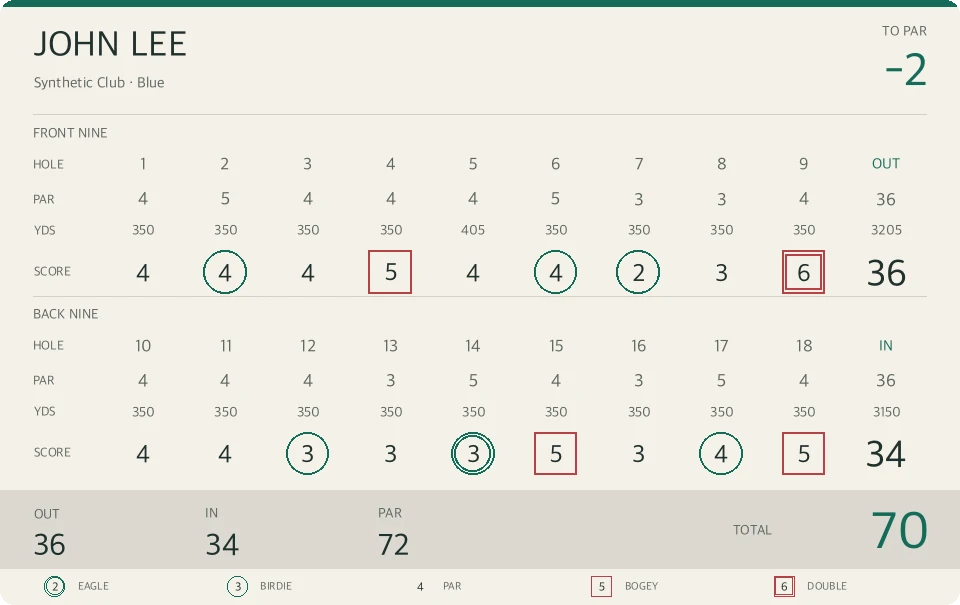
Scorecard, also called Golf Video Studio, turns round and shot details into graphics for your golf videos. Enter the score once, then decide when and where viewers see it.
What you can do
- Build an 18-hole round
- Enter the player, course, tee, par, yardage, and scores. Use a full scorecard or show the front or back nine on its own.
- Time the graphics
- Add a shot card with details such as the club and remaining distance. Set when each graphic appears, then adjust its position, size, colors, and opacity in the preview.
- Export a video to share
- Render the overlays into a single H.264 MP4 with the source audio. Your projects and video processing stay on your device.
Run the local editor
The desktop browser editor runs locally with Python and FFmpeg. The setup guide covers installation and the Expo mobile development client.
Scorecard on GitHub